Ever wondered what actually happens when you turn on a VPN?
You click a button, wait for the connection, and suddenly a website sees a different IP address. It can feel as though you've stepped outside your usual internet connection. But your router and internet provider are still carrying the traffic. The interesting change is where that traffic goes, and who can see which part of it.
Let's follow one website request through a typical VPN connection. Once you can picture the route, the privacy claims become much easier to judge.
Your device adds an encrypted tunnel
Without a VPN, your device sends traffic towards the website through your normal network. With an internet-exit VPN, traffic selected for the tunnel first travels to a VPN server.
The VPN client encrypts that traffic before it leaves your device. Your router forwards the encrypted packets, but the website request is inside the tunnel. The visible destination for this part of the trip is the VPN server.
A full-tunnel setup aims to route your internet traffic through that connection. A split-tunnel setup sends only selected traffic through it. We'll follow the full-tunnel case first, then come back to why that difference matters.
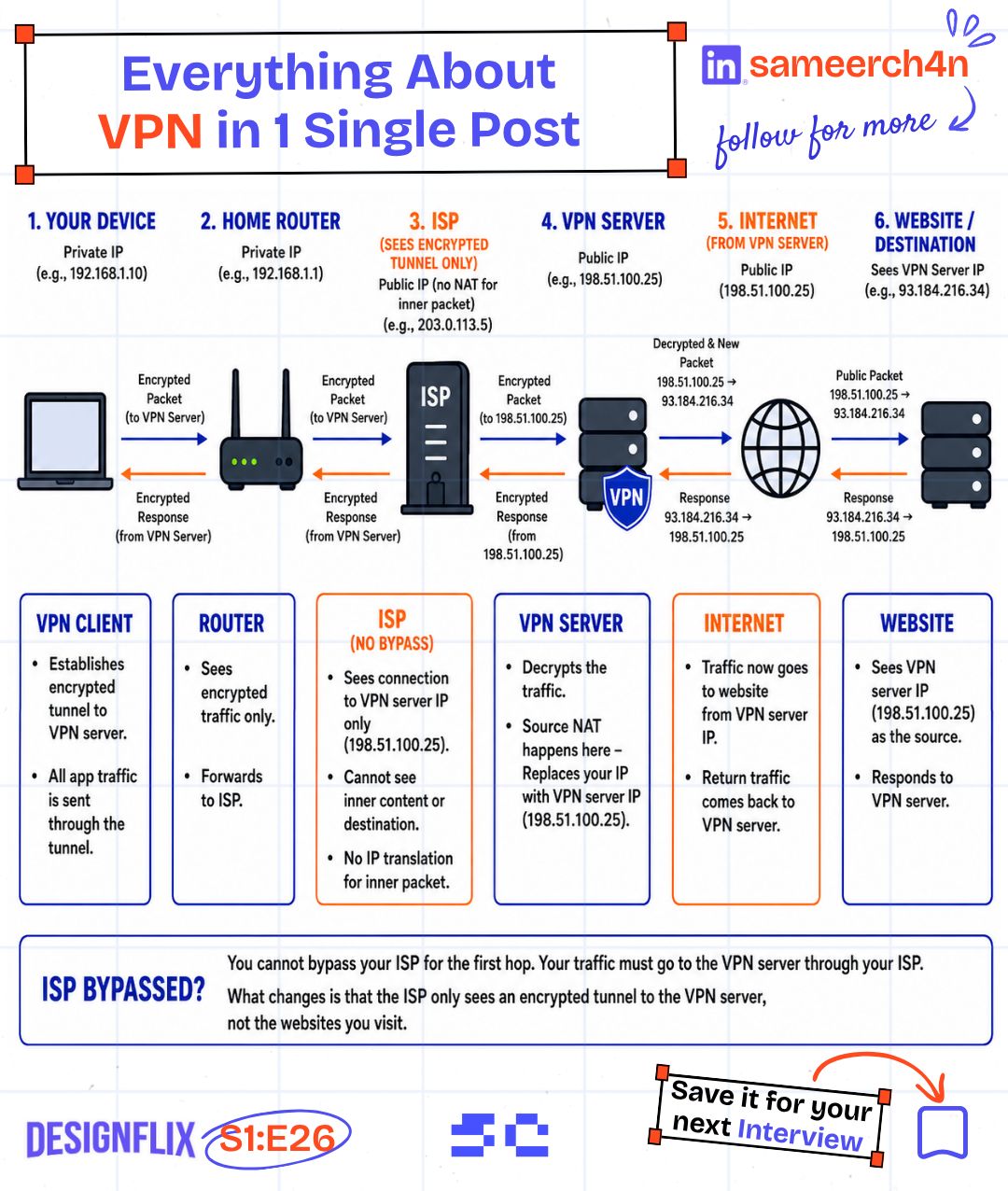
Your ISP is still part of the journey
The VPN server hasn't appeared next to your laptop. Your packets need an internet connection to reach it, and your ISP provides that connection.
For traffic correctly carried inside the encrypted tunnel, the ISP can see things such as:
- Your connection's public IP address.
- The VPN server's address.
- When traffic is sent and how much data moves.
The request's destination and contents are inside the VPN encryption. They aren't exposed in the same way as traffic sent directly outside that tunnel.
That's a useful privacy change, but it leaves the ISP with information about the connection itself. If we imagine the ISP disappearing from the route, the rest of the explanation stops making sense. It is still the road the packets travel on.
The VPN server sends the request onwards
At the other end, the VPN server removes the tunnel encryption and forwards the traffic towards the destination. In a typical consumer IPv4 setup, source NAT replaces the original source address with the server's public address. The website receives the connection from that VPN exit address.
The response travels back through the VPN server, which encrypts it for the return trip to your device. The route looks like this:
Device → Router → ISP → VPN server → Website
Device ← Router ← ISP ← VPN server ← Website
This helps explain why a VPN can change the location a website associates with your connection. The website is looking at the exit address. Your device hasn't moved, but the connection has a different public starting point from the website's perspective.
HTTPS still does its own job
There's an important detail hidden in the phrase "removes the tunnel encryption." If you're visiting an HTTPS website, the traffic also has HTTPS encryption between your browser and the website. Removing the VPN layer doesn't give the VPN server the website's HTTPS plaintext.
The VPN provider can still observe destination connection information, such as IP addresses. What it can learn beyond that depends on the protocols, DNS setup, and traffic involved. Ordinary unencrypted HTTP would expose much more than HTTPS.
And if you log into LinkedIn, that website knows which account you used. A different network address doesn't log you out, clear your cookies, or remove the account identity from the request.
If you've just signed into your own account, what would a different IP address hide from that account's website?
This is the point where it helps to ask a more specific question than "Am I anonymous?" Who are we trying to limit: the local network, the ISP, the destination website, or someone else? A VPN changes the answer differently for each one.

Welcome to the same ISP.
Check the connection you are actually using
You can inspect the public address used by one IPv4 request with ipify's public-IP endpoint:
curl -4 https://api.ipify.org
Run it before connecting and again afterwards. For an illustrative example, the first result might be 203.0.113.17, and the second 198.51.100.24. A changed result tells us that this request used a different public exit address.
Notice the word this. The command doesn't prove that every application, every IPv6 connection, and every DNS query follows the same route. It's a useful check of one path, not a complete VPN audit.
Full tunnel and split tunnel solve different needs
A work VPN might send only your company's private network traffic through the tunnel. Your music app and ordinary browsing can continue using the normal connection. That's split tunnelling, and it can be an intentional choice rather than a leak.
With a full-tunnel configuration, traffic bypassing the tunnel may be unexpected. DNS deserves a separate check because a request for a website's address can reveal information even when the later website connection uses the VPN. IPv4 and IPv6 routing also need to match the intended setup.
Protocols such as WireGuard, OpenVPN, and IKEv2/IPsec provide ways to build VPN connections, but the protocol name alone doesn't describe your routes or permissions. WireGuard's overview is a useful starting point for understanding the tunnel itself.
Follow the route when you debug
For backend work, this route explains several everyday problems: an API suddenly sees a different client IP, a private database becomes reachable, or a request works only after the VPN connects. We can investigate each one by asking which traffic enters the tunnel and where it exits.
So the next time you switch on a VPN, picture the packet's trip. Your ISP still carries it to the VPN server, the server forwards it, and the website answers the connection it receives. Knowing that journey gives you a much better basis for debugging a network problem or deciding which privacy claim to trust.
Try it yourself
A work VPN routes the company network through its tunnel. A public-IP check still shows your normal home address, but the internal dashboard opens. Does that prove the VPN is broken?
Share this article with your friends
Know someone who would enjoy this? Send it their way.