What should a worker do with a message that keeps failing?
Retrying sounds reasonable until the same message fails for the fiftieth time. Meanwhile, valid jobs are waiting, the error logs are growing, and nobody is any closer to fixing the cause.
A dead letter queue gives those failures a place to wait for investigation. Let's follow one delivery job through retries, isolation and recovery, because moving a message out of the main queue is only half the work.
First, ask why the job failed
Suppose an online shop queues a job to create a delivery label. The worker reads the order, calls a courier API, saves the label and acknowledges the message.
Two failures can happen at the same step. The courier may be temporarily unavailable, or the job may contain an address with a required field missing. A later attempt could solve the first; repeatedly sending the same incomplete address won't solve the second.
That distinction should shape the retry policy. Check the error instead of assuming every failure needs another immediate attempt. Invalid input can go straight to a failure path, while a temporary outage may deserve a few delayed retries.
Give retries time and a limit
A retry needs enough time for the cause to change. Hammering an unavailable courier ten times in one second mainly adds traffic to an already struggling service.
Use a bounded policy with increasing delays, and consider adding randomness so many workers don't retry together. An illustrative schedule might wait 5 seconds, then 20, then 60. Those numbers aren't a universal setting; choose them around the operation's deadline and the downstream service.
Also decide what an attempt means in your queue. For example, Amazon SQS uses a receive-count threshold in its redrive policy. Don't assume that count is a perfect record of completed business attempts.
Give the failure somewhere to wait
When the permitted attempts are exhausted, the system can route the message to a dead letter queue, usually shortened to DLQ. We keep the failed job available for investigation instead of letting it consume the same processing capacity indefinitely.
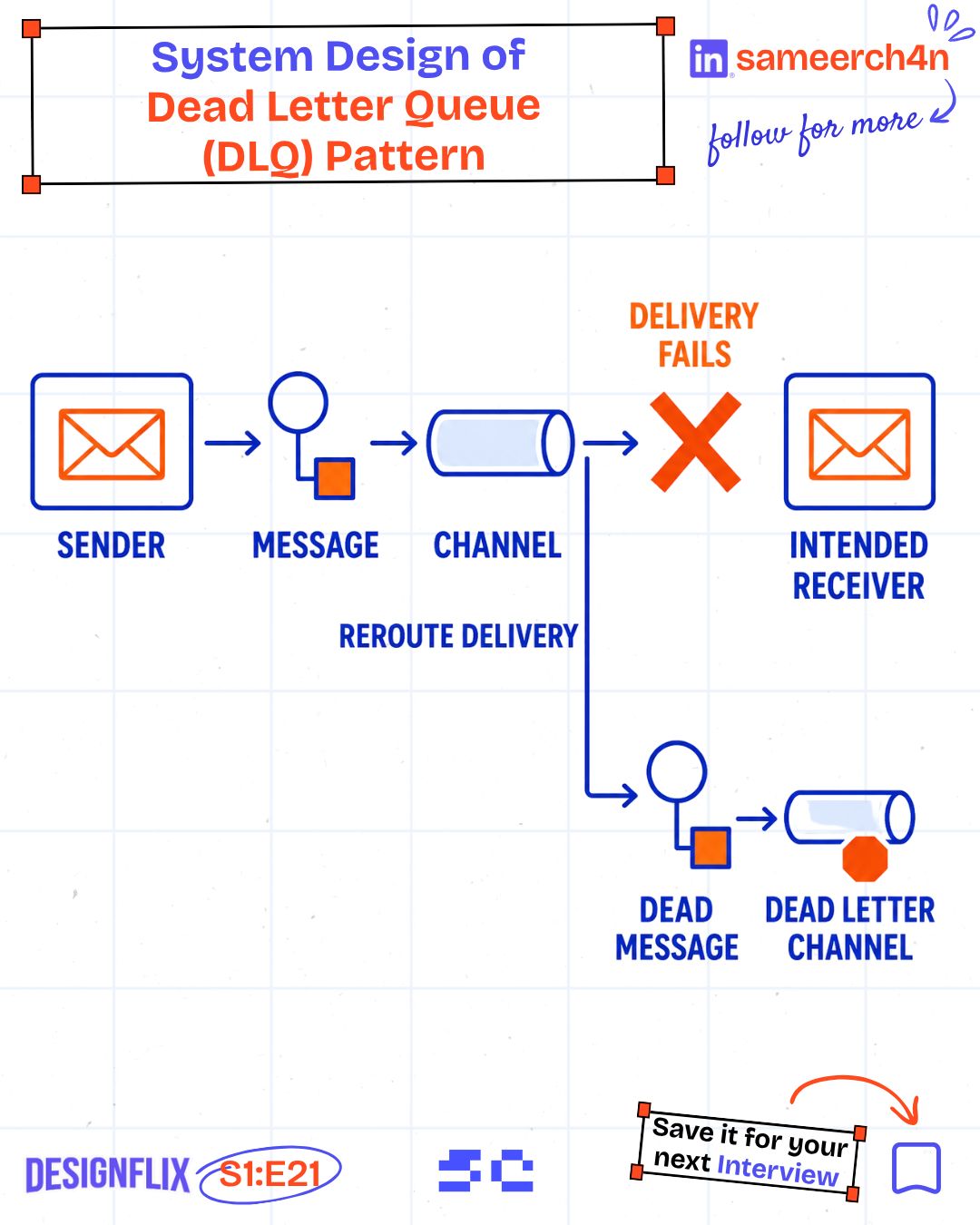
Healthy messages can then continue according to the queue's delivery rules. If your workload depends on strict ordering, check what removing a failed message does to that ordering. An order-update stream may need a different recovery plan from independent delivery-label jobs.
The routing mechanism depends on the product. RabbitMQ's dead-letter exchanges support several causes of dead-lettering. In Kafka applications, a dead-letter topic is commonly an application or connector convention. These aren't interchangeable configuration switches.

I'll be back. After the fix.
Save enough context to investigate
A failed payload by itself can leave us guessing. We need to find the original job, understand what happened, and decide whether replay is safe.
Useful context includes:
- A stable message ID and the business operation it belongs to.
- The original payload and its schema version.
- The latest error, with earlier attempts traceable in logs.
- Attempt times, failure time and the worker or handler version.
- A request or trace ID linking the job to the original request.
Store only the sensitive data the investigation actually requires, and restrict access to it. A queue full of failed delivery addresses still contains delivery addresses.
For our example, the record might say missing_pincode, point to order 318, and identify the payload version. That is enough to begin a useful investigation. "Job failed" isn't.
A quiet main queue can hide unfinished work
Once the failure moves aside, the main queue may look healthy. The customer still has no delivery label.
If the main queue is empty but the DLQ keeps growing, have we finished the work or just moved it?
Track the number of failed jobs and the age of the oldest one. Alert the people who can act on those signals, and make the customer-facing state honest: label creation failed or needs attention, rather than complete.
A DLQ is useful because it preserves a problem we can repair. Without an owner and a recovery process, it becomes a quieter way to forget the problem.
Fix the cause before replaying the message
Suppose the address is corrected. We now have a reason to retry the job, but we should check whether the courier already created a label during an earlier attempt.
A timeout can hide a successful external action. If we blindly replay, the courier might create a second label. Use a stable operation ID, the courier's idempotency support where available, or a reconciliation lookup appropriate to its API.
Replay a small batch first, watch the results, and avoid flooding a service that has just recovered. Keep a record of what was replayed and why. If a message needs repair, preserve the original failure details rather than erasing the evidence.
Design the way back in
A DLQ helps the queue keep moving while giving failed work a recoverable state. It doesn't fix the payload, complete the job or create a missing delivery label.
Before shipping a queue-based feature, test one job that fails permanently and one that succeeds but loses its response. Then practise finding, fixing and replaying them. If you can explain what happens to both, the DLQ is doing more than making the dashboard look clean.
Try it yourself
A delivery-label job times out, reaches the DLQ after retries, and is later replayed. Why could this create duplicate labels, even though every recorded attempt failed?
Share this article with your friends
Know someone who would enjoy this? Send it their way.