You type a website name. The browser needs a network destination. How does it get from one to the other?
DNS is part of that answer: a system for looking up records associated with domain names. Address records help the browser find where it can connect, but the lookup often starts with a cached answer rather than a fresh trip through the whole DNS hierarchy.
Let's follow a website lookup, then use a small command to inspect one ourselves.
Check whether an answer is already available
A browser and operating system may already have suitable cached information. Browser configuration, secure-DNS settings and the operating system determine which resolution path is used, so there isn't one identical cache sequence on every device.
If more work is needed, the client asks a resolver. That could be provided by the network, an ISP or a chosen public provider. The recursive resolver tries to obtain the answer for the client, using its own cache and queries when necessary.
This is why refreshing a page doesn't necessarily produce another full DNS lookup. Existing answers or connections can be reused.
The resolver follows referrals when necessary
For an uncached .com name, the resolver may begin with a root server. The root supplies information directing it towards the .com name servers, rather than returning the website's final IP itself.
The .com servers can refer it to the domain's authoritative name servers. Those servers publish the records for the domain. The resolver follows the relevant information until it has an answer or an appropriate failure.
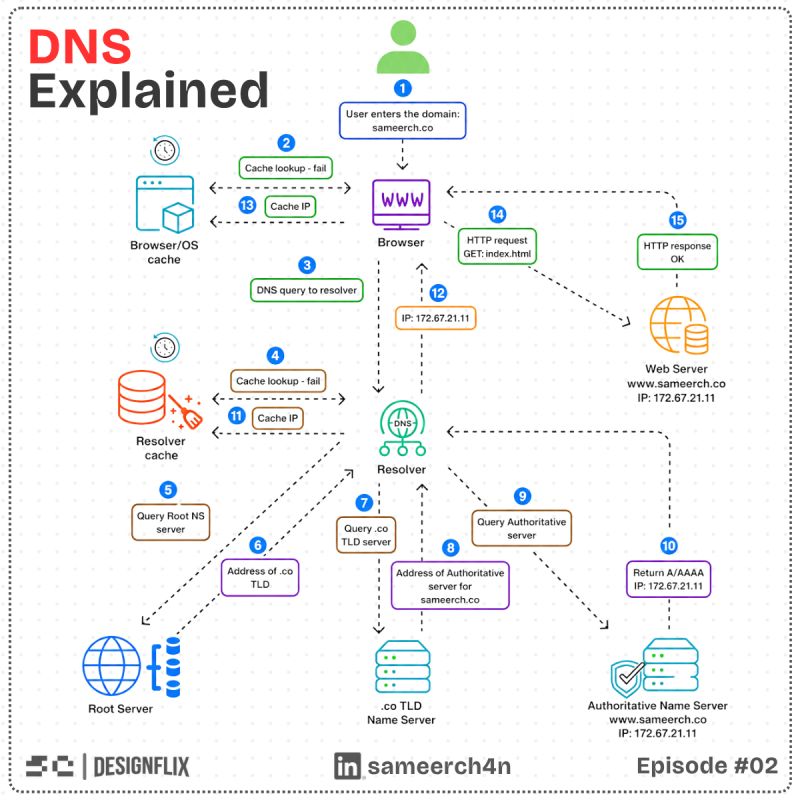
Cached referrals can skip parts of this path. Also, a recursive resolver handling the client's request commonly performs iterative queries through the hierarchy. The browser isn't personally calling every root and TLD server in sequence. RFC 1034 describes the resolver and name-server roles.

Just keep resolving.
Look at the record type, not only the name
An A record supplies an IPv4 address, while AAAA supplies an IPv6 address. A name can have several address answers, and the client still has to choose and establish a usable connection.
A CNAME maps an alias to another name. The resolver may need to follow that name to obtain the requested address records. DNS also serves other purposes: MX records support mail routing and TXT records carry text used by various verification and policy systems.
So "DNS turns a name into an IP" is a useful first explanation for browsing, but it isn't the whole job of DNS.
Inspect an answer with dig
On a machine with dig installed, try:
dig s4meer.com A +noall +answer
dig s4meer.com AAAA +noall +answer
These ask the configured resolver for address records and display the answer section. Results are live and can change; an empty AAAA answer doesn't by itself mean the domain is broken if it has a usable IPv4 path.
Read the record type, value and TTL. If the response came from a cache, its remaining TTL can differ from the original value published at the authoritative server. A query against a chosen resolver shows that resolver's answer, not a guarantee of what every visitor receives.
TTL controls reuse, not instant worldwide replacement
A time to live tells caches how long a record may be reused under the caching rules. After changing an address, visitors can still receive an earlier cached answer until its permitted lifetime runs out.
Lowering a TTL after the change doesn't retroactively shorten every old cached copy. For a planned move, arrange the policy ahead of time and allow the earlier lifetime to pass. Keep the service transition compatible with the expected overlap.
Failures can be cached too. Negative answers, such as a name not existing, have defined caching behaviour; RFC 2308 explains it. Fixing a missing record doesn't mean every resolver must forget its earlier negative answer immediately.
Are we looking at the authoritative record, or an earlier answer somebody is still allowed to reuse?
A correct DNS answer isn't a working website yet
Once the browser has an address, it still needs a connection, appropriate HTTPS validation and a server response. DNS doesn't deliver the HTML or prove the application is healthy.
When a site fails, separate those checks. Can the name resolve? Can the address be reached? Does the certificate match the requested name? Does the server route that name to the intended application?
That sequence avoids changing DNS to fix a server problem, or restarting an application to fix a missing record.
Follow the answer back to its source
DNS works well because a hierarchy of authority and reusable answers makes name lookup practical at internet scale. Caches make most browsing simpler, while also explaining why a new record can take time to appear everywhere.
For your next DNS issue, compare the record type, resolver, authoritative answer and remaining lifetime. Then move on to the connection and application. Knowing where the answer came from is usually more useful than repeatedly refreshing and hoping the next attempt is different.
Try it yourself
You changed an A record and lowered its TTL at the same time, but a visitor still receives the old address. Why might that be expected?
Share this article with your friends
Know someone who would enjoy this? Send it their way.