You press Enter on a URL. A page appears. Between those two moments, the browser has to find a destination, exchange data and turn it into something you can use.
Knowing that journey makes performance problems easier to investigate. A slow server response, a large image and a busy JavaScript thread can all feel like "the site is slow," but they need different fixes.
Let's follow a normal HTTPS navigation, with the shortcuts browsers can take along the way.
Start with the address and anything already available
The browser parses the URL into a scheme, host, path and other components. The host helps identify the destination; the path identifies what we're asking that destination for.
A cached response, an existing connection or a service worker may change how much network work is needed. We shouldn't assume every navigation starts from an empty cache and a brand-new connection.
When the browser needs to resolve the host, it uses the configured DNS path to obtain suitable records. Cached DNS answers can save lookup work; a fresh lookup may involve a recursive resolver and authoritative servers.
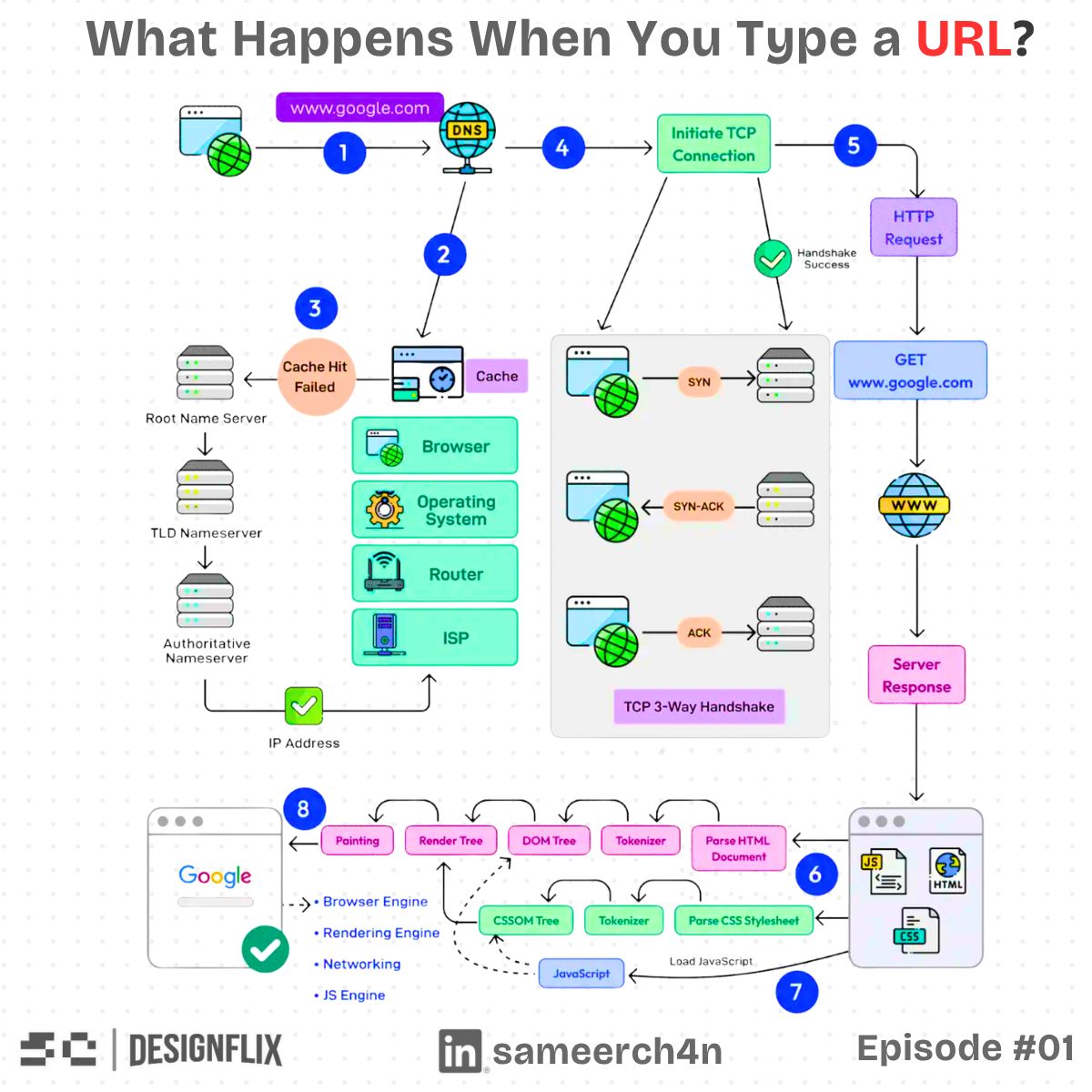
Establish a connection with the appropriate protocol
For HTTP/1.1 or HTTP/2 over HTTPS, a new connection generally involves TCP and TLS. TCP establishes the transport; TLS authenticates the server under the certificate rules and protects the exchanged data.
Those aren't identical steps. Finding an IP doesn't prove that the server at it is authorised to serve the requested name. HTTPS validation is another part of reaching the intended endpoint safely.
HTTP/3 uses QUIC over UDP with TLS integrated into its connection establishment, so the usual TCP three-way-handshake diagram doesn't describe every modern navigation. RFC 9114 defines HTTP/3. Connection reuse and resumption can also shorten work on later requests.
Ask for the document and follow the response
The browser sends an HTTP request, and the serving system returns a response. That system may include a CDN, proxy and application rather than one machine directly generating everything.
A redirect can require another request. A cache hit can avoid application work. A slow application or overloaded database can delay the first response bytes. Each is a different reason the browser waits.
The initial HTML isn't necessarily the whole page. It refers to styles, scripts, images, fonts and other resources. As the browser discovers them, it schedules further fetches under the connection, priority and cache rules.
Turn the document into structures the browser can draw
The browser parses HTML into the document tree, or DOM. CSS becomes style information used to determine how elements should look.
Those structures help it calculate layout: where elements belong and how much space they need. Painting draws their visual content, while compositing combines suitable layers into the final output. The MDN browser guide walks through that process.
This work isn't one final step after every resource finishes. Parsing, fetching and rendering can overlap, and later updates can trigger more layout or paint. That is why the page can appear gradually rather than all at once.
JavaScript can help the page and hold it up
Scripts can add behaviour, fetch data or change the document. They can also block parsing under particular loading arrangements or occupy the main thread with too much work.
A page with small HTML can still feel slow if a long script prevents it from responding. Changing layout repeatedly can also cause unnecessary work if code keeps reading and writing measurements in a costly sequence.
Choose script loading and task sizes around what the user needs first. Deferring suitable code helps only if the deferred work itself doesn't become a large block just as the user tries to interact.
Pixels on screen don't mean the page is ready
An early paint tells us something appeared. It doesn't establish that the main content is present, images are stable or buttons respond promptly.
A simplified progression. Real loading overlaps, and responsiveness or layout can worsen after an early paint.
The browser's load event also isn't a universal promise that all future work has finished. Lazy resources, later requests and user-triggered data can continue afterwards.
At what point can the visitor actually do the thing they came here to do?
Use that question alongside measured loading, layout and interaction behaviour. It keeps optimisation tied to the feature instead of one convenient milestone.

We need to go deeper.
Find the slow boundary before changing the page
Open the browser's network and performance tools and inspect the navigation:
- Is time being spent on name resolution or connection establishment?
- Does the document wait a long time for its first bytes?
- Which resources delay important visible content?
- Is script work blocking interaction?
- Does late content move the layout unexpectedly?
Test with a realistic device, connection and cache state. A warm desktop visit can hide the cost a new mobile visitor pays.
Once the slow boundary is visible, the next change has a purpose: improve the server response, reduce a resource, change loading priority or break up long work. The URL-to-page journey is useful because it turns one vague complaint into a set of questions we can actually answer.
Try it yourself
The page paints quickly and its load event has fired, but clicking a button feels delayed. Should you assume the network is still the main problem?
Share this article with your friends
Know someone who would enjoy this? Send it their way.